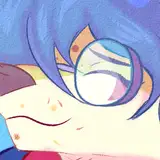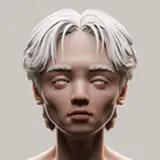
rendered with cycles (having trouble seeing the Iris in your viewport? read the FAQ!)
Tiny Eye is a FREE, fully procedural, stylised eye that works in both Eevee and Cycles (Blender). It's flexibility, paired with a library of ready-to-use presets, allows for you to quickly create a wide variety of eyes.
Show me your tiny eye works #tinyeyeb3d
I've officially launched a Patreon! Subscribing to the lowest tier will grant you access to the Baked version of the entire Tiny Eye collection. On top of that, you'll get early access to at least one new preset a month!
If you're feeling extra generous, subscribing to the Sponsor tier means you will get to pick an eyeball each month and permanently have your display name tagged to, as a sponsor. Your display name will also be permanently displayed on the sponsor page in the gumroad library, and will be linked to one link of your choice (e.g. portfolio, social media, etc)
shows you how to set it up and explains all the functions
- How do you bake/export textures?- At the moment, you would have to dive into the Node groups and bake textures the old school way. Honestly, I made this eye to work only in Blender because it’s where I do all my works. But I promise once I find a solution and have the time, I’ll drop an update including a demo vid.- Why can't I see the Iris / Why does the Cornea appear black?- Tiny Eye 1.2 and before: under “Render Properties”, scroll down to “Light Paths” and increase “Transparent Light Paths”. Also, Update Blender (at least version 3.2).Before you read the license agreement, I want to clarify that you can use, remix and include Tiny Eye in your commercial works (artworks, courses, characters, films, video games) and you don't even have to credit me every single time you use Tiny Eye, as long as you don't claim that you created Tiny Eye when somebody asks you about the eye. Credit is always welcomed, but it's not mandatory! Hope this clears things up!
30 May 2023
The products may be used commercially as long as it does not violate the following:
01 May 2023
The products may be used commercially as long as it does not violate the following:
23 December 2022
The products may be used commercially as long as it does not violate the following:
Tiny Eye 1.3
01 January 2024
Add Menu Addon Assets spawn at 3D CursorTiny Eye 1.3
31 December 2023
Support for Blender 3.0 and 4.0New Add Menu AddonAsset BrowserNew Category: SimpleShape Keys 1.3Revamped Iris Size from "Size" to "Grow & Shrink"Added Oval IrisAdded Square IrisAdded Oval PupilAdded Square PupilTiny Iris 1.3Revamped Shader (video)Tiny Sclera 1.3Revamped Shader (video)Tiny Eye 1.2.3
12 December 2023
Tiny Sclera 1.2.3Fixed "glowing" bug for Blender 3.0 to 3.1Tiny Eye 1.2.2
30 October 2023
Tiny Sclera 1.2.2Cornea Refraction added for EEVEENew Property: IOR sliderTiny Eye 1.2.1
18 September 2023
Tiny Sclera 1.2.1Cornea Refraction added for CyclesModifierCornea Mask for easier Viewport Solid Mode experienceTiny Eye 1.2
25 May 2023
New Asset BrowserShape Keys 1.2Added Heart PupilAdded Reptile PupilAdded Goat PupilTiny Sclera 1.2New Property: Blood RednessNew Property: VeinsNew Property: Veins ScaleNew Property: Veins HeightNew Property: RandomizeTiny Eye 1.1.2
29 April 2023
Add-on for Easy Importput together by https://www.instagram.com/2bcozy
Tiny Eye 1.1.2
30 January 2023
Shape Keys 1.1.2Increased "Range Max" for Pupil SizeTiny Iris 1.1.2Removed Secondary Scale & ContrastPri Ciliary Hue no longer affects CryptsWhen Pri Ciliary Scale Value set at 0, Ciliary Zone no longer disappearsBeta Testing Revised Naming conventionTiny Eye 1.1.1
07 January 2023
Shape Keys 1.1.1As requested, added Cat PupilTiny Iris 1.1.1Beta Testing Primary Ciliary HueTiny Sclera 1.1.1Fixed Blood & Shadow, now works with Mirror ModifierTiny Eye 1.1
06 January 2023
Now compatible with versions before Blender 3.4Improved Shader Nodes usabilityShape Keys 1.1Reworked & Improved the shape of Cornea BulgeTiny Iris 1.1New Property: Primary Ciliary DetailsNew Property: RandomizeImproved Primary NoiseTiny Sclera 1.1New Property: Cornea SoftnessNew Property: ShadowNew Property: BloodTiny Eye 1.0.1
28 December 2022
Support for Blender Version 3.3.1 and beforeTiny Eye 1.0.1
26 December 2022
Fixed Rotation Default ValueChanged Scelra & Iris Roughness Default ValueINCLUDED PRODUCT IN DOWNLOAD (my bad how did I miss that smh)Tiny Eye 1.0
23 December 2022
Released for Blender 3.43.0
supports blender 3.0 onwards
Tiny Eye Bake Addon (supports 1.3 only)
created by Santiago109
supports blender 3.0 and above
Older versions have been moved to Google Drive because free products on Gumroad have a 250mb file size limit. Click here
Tiny Eye Sponsors were classified as people who has contributed $15 and above, or those who were subscribed to my Patreon under the title "Not Tiny At All", which has been discontinued.
The sponsor benefits have been discontinued. However, if you donated $15 and above, feel free to drop me an email at tinynocky@gmail.com:
- Subject/Title: Tiny Eye Sponsor (Gumroad)
- Include your username
- Include 1 link to your social media/portfolio
As a form of courtesy, I will include your name in the list of sponsors above!
The illustrated guide can be found in the front page
or watch how to set it up here! (starts at 6:43)