 I'd be lying if I didn't admit I mostly got a Quest 3 for the passthrough smut, but there's surprisingly little of it out there!
I've mentioned in other posts that I've been using the passthrough transparency to help fix scaling issues in some of my animations (by comparing the animation scale to the real world and myself), and that's got me thinking, how easy is it to create passthrough animations in Blender?
Turns out it's fairly simple, but there's one crucial issue: I want to accommodate supporters who have a passthrough capable headset, and those who don't, but it's not really feasible for me to render my animations twice (once with transparency, then again with an environment) due to their length.
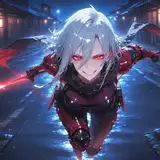
One solution to this, as seen in the images attached (which are also in the VR Testing folder in the Mega Archive), is to render the animation with transparency, then put that on a green background for passthrough users, but also render the background environment as a still image, and use that as a background for non-passthrough users. This means I can render the animation once, but just change the background when compositing the videos in Adobe Premiere. The downside of this for the non-passthrough video is that the animated characters won't cast realistic shadows on the background image, but maybe that's okay? I plan to do a test of this using the Tracer animation, but let me know what you think in the poll or comments!
WhyfuVR
2024-05-03 19:13:14 +0000 UTCjobo
2024-05-03 18:39:44 +0000 UTCWhyfuVR
2024-05-03 15:43:00 +0000 UTC