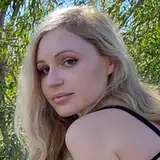
Today I am working on a series of my wonderful and super-hairy young model Silene. There is still a lot of work ahead, but meanwhile I use the occasion to give my patrons an insight into the workflow.
For all of my patrons there is a gif-image in the galery, and for my patrons of Power-level and up, there are the full size images of all steps in original size, from the original to the final edition.
I take photos in raw-format, which means that I have aces to all the data that the chip captures. At the same time the camera produces a jpg-version, more or less optimized to what the program of the camera "thinks" is the best. I use those jpg's to make the selection of the images I will then edit one by one.
The first image is the jpg-version as the camera produces it.
I then open the raw-file in Canon's tool and correct the white-balance (the colors), the brightness and (if I don't forget it) the distortion the wide-angle lens produces.
The second image shows the result of this process.
It lacks a bit of contrast and vividness, and I correct this with a script I wrote.
The third image shows the result of that script. It is a bit too hard, too bright. So I combine the second and third image using my editor program "The Gimp": I load the second, a bit flaw version and put the third, a bit too hard version in a layer above it. Then I reduce the opacity of this layer making it a bit transparent, so that the flaw version "shines through" and in the end there is a mix between the second and the third version.
This is here the 4th image: the final version in regard of color and contrast correction.
Now comes the tedious work of retouching. as you know I do not "better" anything on the bodies of my models, usually I do not remove scars and things like that (except the model explicitly asks me to). But I take away temporary skin blemishes, spots, things like that.
Because I want to preserve the original skin impression I cannot use those "skin beautifier"-filters - they would remove all the pores, and, in this case, all those lovely tiny hairs that cover all of Silene's delightful body.
So I have the image in full size (sometimes in double size) on my screen and scroll through it part by part and correct each and every single spot individually. If it is just a reddish spot I use the brush tool to correct the color (to take away the red), but often spots are a bit elevated and leave a shadow, so that simply taking away the red isn't enough. Here I use the "healing tool": I take a copy of a neighboring part and put it over the blemish, mixing the original with the content of the copy. Sometimes I have to do that several times until the blemish disappears and - here - also to fill the "repaired" part with those tiny hairs again.
The final retouched image is the last image in this series.
You can see them in an animated gif in the gallery, and, if you are on Power-level or up, in the wallpapers series: each step in full size.
... and as soon as I finished the work, you'll see the complete series. soon :-)