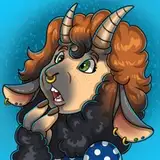
Happy St. Patrick’s Day everyone! ☘️
I decided to test out this new art style by creating a redraw of my St. Paddy’s piece from 2023: https://www.deviantart.com/blacksheeptfs/art/Happy-St-Patricks-Day-954001713
Full piece is posted to all my socials, but here is a step-by-step tutorial of how I made it. (TBH I wrote this out is mostly for myself since I’m so new to this and need a refresher to refer back to 😅)
I use Procreate on the iPad, but I’m sure a lot of these principals and techniques can be applied to other drawing apps, they might just have different names.
(*) indicated the brush I used
-Starting off with the sketch. Pretty heavily referenced the original piece for the pose, just wanted her to be more horsey, less cartoony. *Technical Pen
-Lineart, focusing on thicker/darker lines in heavy areas. *Chalk
-Added another layer under the lineart. Using the Lasso tool, I added shading in with *6B Compressed.
-Brought the Opacity down to 35% and merged with the Lineart layer.
-Filled in the flat colors under the Lineart *Technical Pen
-New layer on top of the Lineart. I turn on Clipping Mask and color the lineart with a darker color than the flats under it. *6B Charcoal
-Add in some highlights to the flat colors. *Chalk
-Put in a simple background. Sampled the lightest background color and added in bounce light on the outside. *Chalk
-Purple and light purple on a new layer in top of everything. *Soft Airbrush
-Change purple layer from ‘Normal’ to ‘Overlay’
-Opacity down to 30-40%
-A few final touches. Fixed some shaded parts, added a little fur and hair strands with the *Chalk.
-Last step is to merge everything and add Noise, about 8%
Cori Webb
2025-03-19 07:09:35 +0000 UTC