Discord is up and running!
Added 2021-08-23 09:28:27 +0000 UTCYou all have auto invites already and assigned roles.
My creator just added Discord as a benefit — how do I get my Discord role?
If your creator is introducing Discord roles as a new benefit, don’t worry, as an existing patron, the new benefit will be extended to you.
When a creator announces that they’ve included Discord as a new benefit for patrons in your Tier, follow the steps below to access your role:
Step 1: Log in to your Patreon account, and head to the Apps tab of your Profile settings page.
Step 2: Click on the Connect button next to the Discord app.
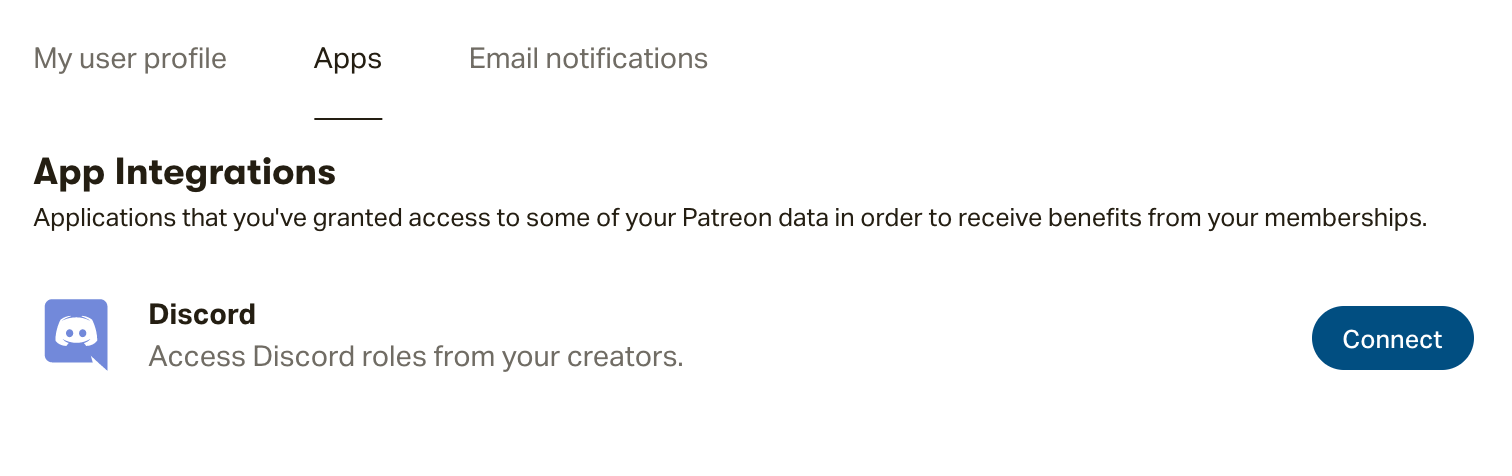
Step 3: Now that your Patreon and Discord accounts are communicating, our integration will assign you the role tied to your Tier!
You can access your new role by logging in to your Discord account.
Note: Already have Discord connected to your Patreon account for another membership? Then there's nothing you need to do! You should find the server for the creator who's now offering Discord populate when you next log in to Discord.